
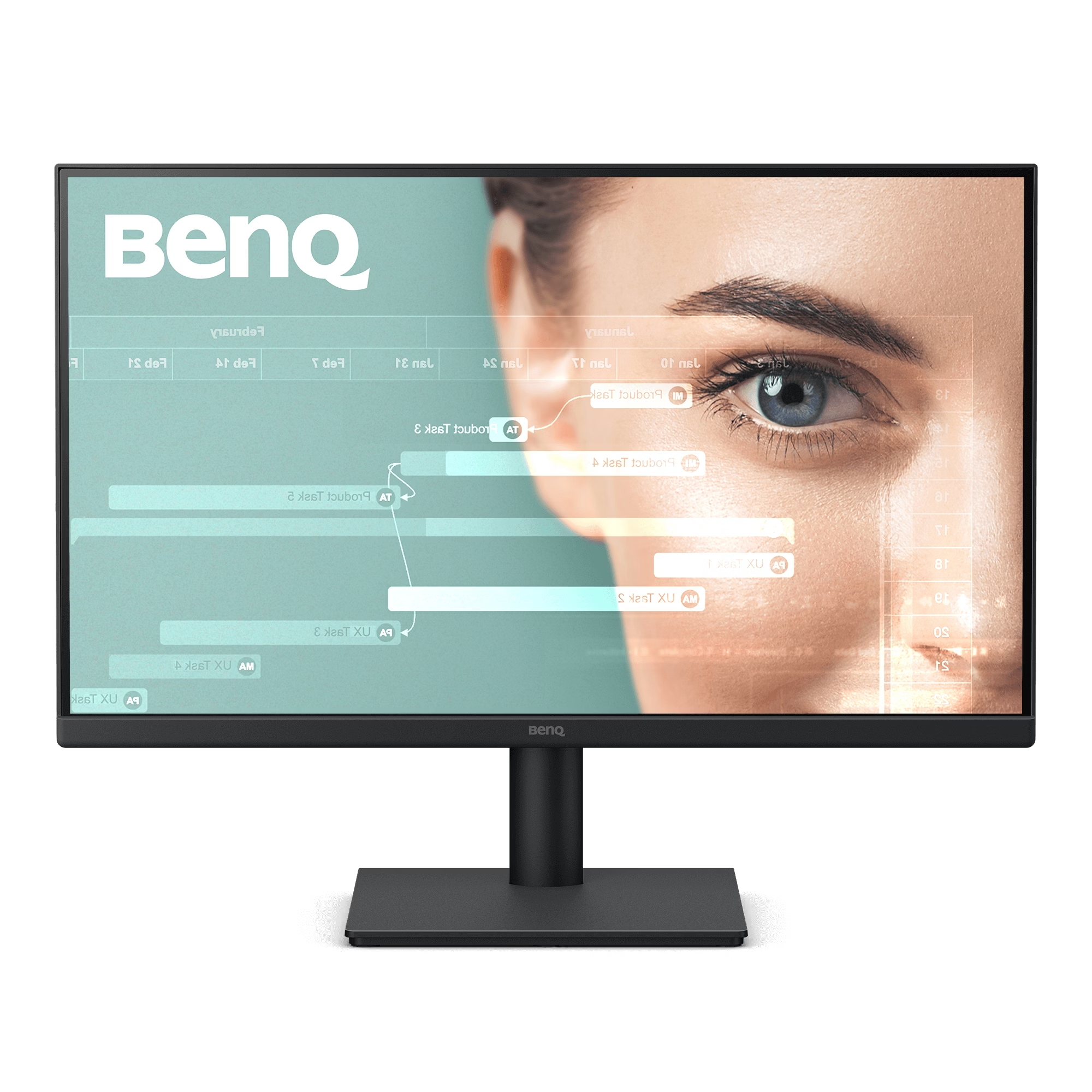
BenQ GW2490: The Ultimate Eye-Care Productivity Hub
The BenQ GW2490 is an extraordinarily versatile 23.8-inch monitor meticulously engineered to serve as the visual centerpiece of modern home offices, software development studios, and corporate workstations. As professionals spend increasingly long hours staring at digital interfaces, standard monitors often induce severe visual fatigue, headaches, and disrupted sleep patterns. The BenQ GW2490 directly combats these issues by blending a high-performance In-Plane Switching (IPS) panel with industry-leading, proprietary visual protection technologies. Delivering a perfectly balanced Full HD (1920×1080) resolution, this monitor ensures that every line of text, complex spreadsheet, and multimedia presentation is rendered with absolute, razor-sharp clarity while maintaining an incredibly sleek physical footprint on your desk.
Exceptional Color Accuracy and 100Hz Fluidity
At the core of the BenQ GW2490 lies a premium In-Plane Switching (IPS) panel that guarantees lifelike color reproduction. Covering an impressive 99% of the sRGB color gamut, this display ensures that graphic designers, marketing professionals, and content creators see true-to-life colors that remain perfectly consistent even when viewed from extreme 178-degree horizontal and vertical angles. Moving beyond standard 60Hz displays, this monitor features a rapid 100Hz refresh rate combined with a 5ms (GtG) response time. This massive 66% increase in frame rendering translates to a buttery-smooth visual experience. Whether you are rapidly scrolling through thousands of lines of code, navigating dense PDF documents, or unwinding with fast-paced video streaming, the 100Hz panel effectively eliminates distracting motion blur and screen judder, providing unparalleled daily viewing comfort.
Brightness Intelligence Gen2 and Smart Eye-CareU
What truly separates the BenQ GW2490 from standard office monitors is its active, hardware-level commitment to your long-term visual health. The monitor features BenQ’s exclusive Brightness Intelligence Gen2 (B.I. Gen2) technology. Utilizing a highly sensitive optical sensor hidden in the bottom bezel, B.I. Gen2 actively detects changes in your room’s ambient lighting—from a bright, sunlit morning to a dim evening—and dynamically adjusts the screen’s backlight intensity and color temperature in real-time. This prevents the screen from becoming overexposed and blinding in dark rooms while enhancing the visibility of dark areas in bright environments.
Furthermore, the GW2490 is backed by strict TÜV Rheinland certifications (Eye Comfort 2.0, EyeSafe 2.0). It utilizes hardware-level Low Blue Light Plus filters to block harmful blue-violet radiation while maintaining vivid color accuracy, alongside advanced Flicker-Free technology to eliminate the invisible screen strobing that causes tension headaches. Users can take absolute control of their visual wellness using the integrated Eye-CareU software, which features smart screen time limits, light reminders, and posture-correcting distance reminders via quick on-screen controls.
Advanced Color Modes for Seamless Multitasking
Understanding that modern workflows require specialized visual settings, the BenQ GW2490 includes several dedicated color modes tailored to specific tasks. The specialized Coding Mode optimizes the contrast and saturation specifically for dark-mode IDEs, making every syntax color stand out for effortless readability. For reading long documents, the ePaper Mode simulates the look of a physical e-book, meticulously balancing text contrast and background brightness to drastically reduce eye strain during prolonged reading sessions. Finally, the M-Book mode perfectly synchronizes the monitor’s visual output to match the precise color profile of your connected Mac device, ensuring seamless visual continuity across your Apple ecosystem.
🌟 Deep-Dive Features and Benefits
- 23.8-Inch FHD IPS Display: Delivers stunning 1920×1080 resolution with a 99% sRGB color gamut for highly accurate, vibrant image quality.
- Fluid 100Hz Refresh Rate: Renders on-screen motion incredibly smoothly, significantly reducing retinal fatigue during scrolling and video playback.
- Brightness Intelligence Gen2: Dynamically adjusts screen brightness and contrast based on your room’s ambient lighting to ensure optimal viewing comfort day or night.
- VESA Certified MediaSync: Guarantees absolutely jitter-free video playback, flawlessly supporting all international broadcast video formats for an optimal multimedia experience.
- Extensive Connectivity: Features two HDMI 1.4 ports and one DisplayPort 1.2, allowing you to connect a work laptop, desktop PC, and console simultaneously.
- Integrated Audio Solution: Keeps your desk completely free of cable clutter by incorporating dual 2W built-in speakers for video calls and casual media listening.
💼 Applications Across Various Workspaces
- Software Development & Coding: Developers will massively benefit from the dedicated Coding Mode, which enhances dark-mode contrast, while the 100Hz refresh rate ensures that rapidly scrolling through hundreds of lines of syntax remains smooth and blur-free.
- Home Office & Remote Work: The built-in speakers and Eye-CareU software create the perfect daily driver for remote employees. The software actively reminds you to take breaks and correct your posture during long stretches of virtual meetings and data entry.
- Multi-Device Command Centers: Because the GW2490 is equipped with three separate display inputs (2x HDMI, 1x DisplayPort), you can easily wire your corporate laptop, personal desktop, and a secondary testing machine into one screen, utilizing the convenient on-screen buttons to switch seamlessly between them with one click.
🔗 Enhance Your Digital Ecosystem
To fully maximize the ergonomic potential of your new BenQ GW2490, we highly recommend utilizing its built-in VESA 100x100mm compatibility. By mounting this display on our premium Adjustable Dual-Monitor Desk Arms, you can reclaim massive amounts of desk space and position the screen at perfect eye level to prevent neck strain. To ensure you are pushing the maximum 100Hz refresh rate without any signal degradation, bypass standard cables and connect your PC using our high-bandwidth Gold-Plated DisplayPort Cables. Finally, since this monitor is engineered for long hours of productivity, complement your eye-care setup with our ergonomic Wireless Mechanical Keyboards to reduce wrist fatigue during intense coding or writing sessions.
❓ Frequently Asked Questions (FAQs)
1. Does the BenQ GW2490 feature a DisplayPort connection?
Yes. Unlike many standard office monitors that only offer HDMI, the BenQ GW2490 provides extensive connectivity by including one DisplayPort 1.2 alongside two HDMI 1.4 ports. This allows you to connect up to three separate devices simultaneously and switch between them effortlessly.
2. How exactly does Brightness Intelligence Gen2 work?
B.I. Gen2 utilizes a small, highly sensitive optical sensor located at the bottom of the monitor’s bezel. This sensor actively measures the ambient light in your physical room. If the sun goes down or you turn off your office lights, the monitor automatically lowers its backlight brightness to prevent eye strain. It also dynamically adjusts image contrast to ensure dark areas remain visible without overexposing bright scenes.
3. Will the 100Hz refresh rate actually make a difference for office work?
Absolutely. While high refresh rates are heavily marketed toward gamers, a 100Hz refresh rate provides a massive ergonomic benefit for office workers. By drawing the screen 100 times per second instead of the standard 60, moving your mouse cursor, dragging windows, and scrolling through dense Excel spreadsheets looks incredibly fluid, drastically reducing the micro-stutters that cause visual fatigue over an 8-hour workday.
4. Does this monitor include built-in speakers?
Yes! The BenQ GW2490 comes equipped with two 2W built-in speakers. This provides clear, convenient audio for your Microsoft Teams meetings, Zoom calls, and casual video streaming without forcing you to clutter your pristine desktop with external speaker wires. It also includes a dedicated headphone jack for private listening.
5. What is the ePaper mode, and who is it for?
The ePaper mode is a specialized color profile designed specifically for heavy reading. It simulates the visual aesthetic of a physical e-book reader by balancing the contrast between black text and the white background, and shifting the color temperature to a comfortable, paper-like hue. It is perfect for researchers, students, and analysts who spend hours reading long PDF documents.
6. Can I mount the BenQ GW2490 on a wall or dual-monitor arm?
Yes. The monitor is fully compliant with the VESA 100mm x 100mm mounting standard. You can easily detach the included desktop base and screw the panel directly onto any third-party ergonomic monitor arm, dual-display stand, or wall bracket.
7. Is the monitor compatible with MacBooks?
Yes, it is highly compatible. You can connect your MacBook via an HDMI or DisplayPort adapter. Additionally, the monitor features a dedicated “M-book” color mode in its settings, which specifically aligns the monitor’s color output to match the distinct color profile of Apple’s retina displays.
8. What is VESA MediaSync?
The GW2490 is VESA MediaSync certified, which guarantees that the monitor will provide absolutely jitter-free playback when watching videos. It perfectly synchronizes the display to match all international broadcast video formats, ensuring that movies and media streams play exactly as the director intended without stuttering or dropped frames.
📦 Package Contents
- 1 x BenQ GW2490 23.8″ IPS Monitor
- 1 x Desktop Monitor Stand & Base
- 1 x Built-in Power Supply Cable (100 – 240V)
- 1 x HDMI 1.4 Cable (Note: Signal cables may vary by specific region)
- 1 x Quick Start Guide, Safety Instruction & Warranty Card
🏬 Why Choose Indica Computers for Your IT Procurement?
- 100% Genuine Hardware Guarantees: We guarantee that every single BenQ monitor we sell is completely authentic, factory-sealed, and sourced strictly through authorized national distribution channels. You will never receive grey-market or refurbished panels.
- Seamless B2B GST Billing for Corporates: Claim your full input tax credit effortlessly. Our verified, highly automated GST invoicing system is designed specifically to streamline corporate IT procurement, remote work provisioning, and bulk office hardware upgrades for businesses across India.
- Trusted Localized Support in Bengaluru: Beyond simply moving boxes, we provide fast, localized after-sales assistance. Whether you need display troubleshooting, assistance filing warranty claims, or advice on integrating new hardware into your commercial server network, our dedicated experts at Indica Computers are here to help.
📊 Detailed Technical Specifications
| Attribute | Value |
|---|---|
| Brand | BenQ |
| Model | GW2490 |
| Screen Size | 23.8 Inches (60.45 cm) |
| Panel Type | IPS (In-Plane Switching) |
| Resolution | 1920 x 1080 (Full HD) |
| Refresh Rate | 100Hz |
| Response Time | 5ms (GtG) |
| Brightness (Typical) | 250 nits |
| Contrast Ratio | 1300:1 (Native) |
| Viewing Angle | 178° (H) / 178° (V) |
| Color Gamut | 99% sRGB |
| Display Colors | 16.7 Million Colors |
| Connectivity | 2 x HDMI 1.4, 1 x DisplayPort 1.2 |
| Audio | Built-in Speakers (2W x 2), Headphone Jack |
| Eye Care Features | Brightness Intelligence Gen2, Flicker-Free, Low Blue Light (Hardware), Eye Reminder |
| Certifications | TÜV Eye Comfort 2.0, EyeSafe 2.0, VESA MediaSync, Energy Star 8.0 |
| VESA Wall Mount | 100 x 100 mm |
| Adjustable Stand | Tilt: -5° to +20° |
| Power Consumption | 20W (Normal) / 30W (Max) |
| Dimensions (with Stand) | 408 x 540 x 182 mm |
| Net Weight | 3.93 kg (With Base) |
Reviews
There are no reviews yet.