
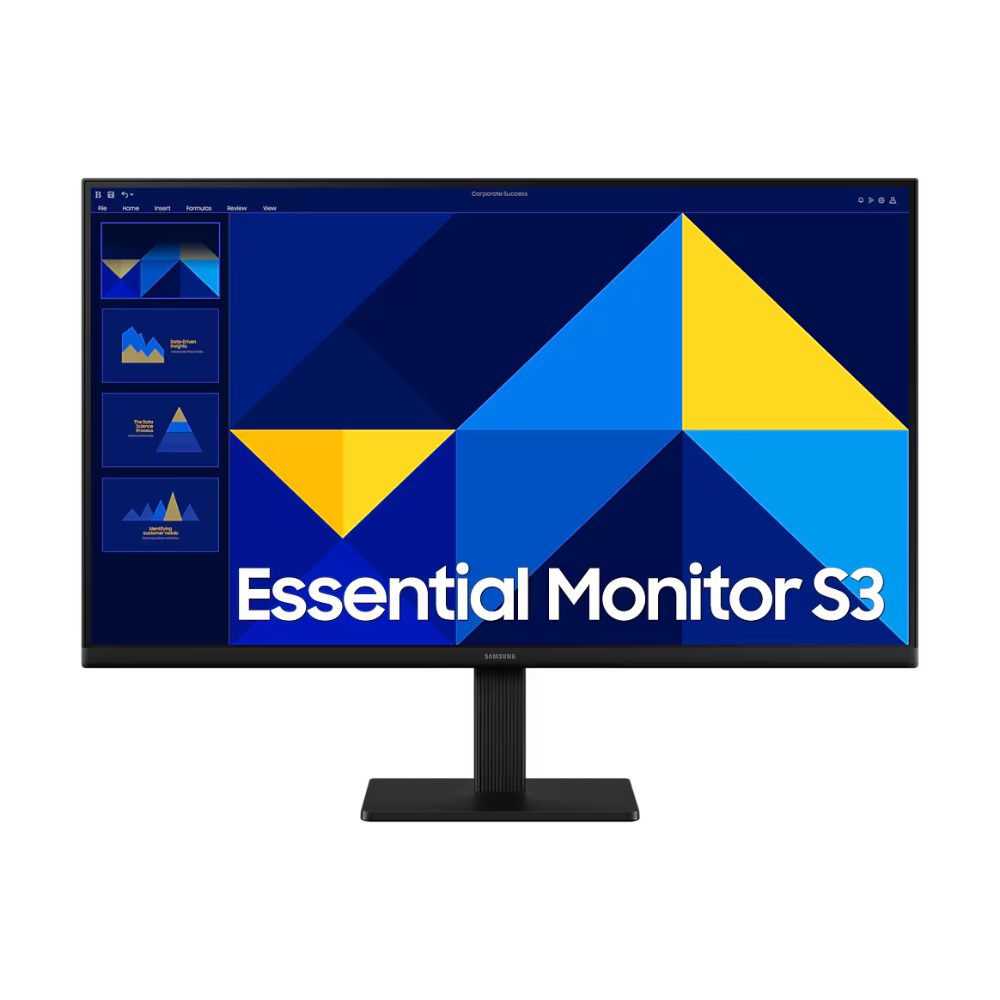
Elevate Your Workspace with the Samsung S24D300GAW
In today’s fast-paced digital environment, having a reliable and spacious display is crucial for maximizing productivity. The Samsung S24D300GAW delivers a stunning visual experience by pairing an advanced IPS panel with crisp Full HD resolution across a comfortable 24-inch screen. Whether you are analyzing complex data, editing photographs, or enjoying high-definition media, this monitor provides flawless clarity from virtually any angle.
Why Choose the Samsung S24D300GAW for Your Setup?
Screen tearing and eye strain can severely hinder your daily workflow. This monitor tackles those issues head-on with a rapid 100Hz refresh rate, Eye Saver Mode, and Flicker-Free technology to ensure comfortable, long-lasting usage. Additionally, its super-slim, borderless design not only modernizes your desk but makes it the perfect candidate for seamless dual-monitor configurations in professional environments.

🌟 Key Features of the Samsung S24D300GAW
- Vibrant 24-Inch IPS Panel: Experience remarkable color accuracy and consistent shades across the entire screen. The expansive 178° viewing angles ensure clear visuals from any position without frustrating color washing.
- Smooth 100Hz Refresh Rate: Significantly reduces input lag and motion blur, ensuring fluid performance during fast-paced games, endless scrolling, and action-packed videos.
- Borderless Design: Features a modern, ultra-thin bezel that enhances your focus and creates a nearly gapless viewing experience when placing two monitors side-by-side.
- Eye Care Technology: Built-in Eye Saver Mode minimizes harmful blue light emissions, while Flicker-Free technology reduces eye fatigue during extended work or study sessions.
- Dedicated Game Mode: Instantly optimizes color and image contrast to give you a competitive edge, easily revealing details hiding in darker scenes.
- Versatile Connectivity: Equipped with both HDMI and D-Sub (VGA) ports to easily connect modern PCs, laptops, and older legacy systems.
💼 Applications of the Samsung S24D300GAW
- Corporate Offices: The ideal 24-inch sweet spot for multitasking, data entry, and seamless multi-monitor workstations.
- Home Offices & Remote Work: A dependable daily driver for video conferencing, extensive document editing, and web browsing.
- Education & E-Learning: Protects students’ eyes during long study sessions, online classes, and project research.
- Casual Gaming: The 100Hz refresh rate and Game Mode provide a noticeable upgrade over standard 60Hz monitors for budget gaming setups.
📊 Technical Specifications
| Specification | Details |
|---|---|
| Brand | Samsung |
| Model | S24D300GAW (LS24D300GAWXXL) |
| Screen Size | 24 Inches (60.5 cm) |
| Panel Type | IPS (In-Plane Switching) |
| Resolution | FHD (1920 x 1080) |
| Refresh Rate | Max 100Hz |
| Response Time | 5ms (GTG) |
| Aspect Ratio | 16:9 |
| Brightness (Typical) | 250 cd/㎡ |
| Contrast Ratio (Static) | 1000:1 |
| Viewing Angle (H/V) | 178° / 178° |
| Color Support | 16.7 Million Colors (72% NTSC) |
| Ports & Connectivity | 1x HDMI (v1.4), 1x D-Sub (VGA) |
| Wall Mountable | Yes (VESA 100 x 100 mm) |
| Dimensions (With Stand) | 54.07 x 42.85 x 17.51 cm |
| Weight (With Stand) | 2.4 kg |
| Warranty | 3-Year Manufacturer Warranty |
📦 Package Contents
- Samsung Essential S3 24″ Monitor (S24D300GAW)
- Monitor Stand & Base
- HDMI Cable
- Power Adapter & Cable (1.5m)
- Quick Setup Guide & Warranty Card
❓ Frequently Asked Questions
1. Does the Samsung S24D300GAW have built-in speakers?
No, this model focuses on display quality and does not feature integrated speakers or an audio-out jack. You will need to route audio directly from your computer to external speakers.
2. Can I mount this 24-inch monitor on a wall?
Yes, it features a standard VESA mount interface (100 x 100 mm), making it exceptionally easy to attach to a wall bracket or a dual-monitor desk arm.
3. How do I enable the 100Hz refresh rate?
The default refresh rate is typically set to 60Hz out of the box. You can manually adjust it to the maximum 100Hz through your Windows or macOS display settings.
4. Does it connect to older computers?
Yes, it is highly versatile, featuring both a modern HDMI port and a legacy D-Sub (VGA) port for broad compatibility.
5. Is this monitor comfortable for long work hours?
Absolutely. It incorporates Samsung’s Eye Saver Mode and Flicker-Free technology, specifically designed to reduce eye strain during prolonged screen time.
🏬 Why Buy from Indica Computers?
- Genuine Products: We guarantee 100% authentic IT hardware sourced directly from Samsung’s authorized distribution network.
- GST Billing: B2B customers can effortlessly claim input tax credit using our verified GST invoices for all corporate orders.
- Expert Product Consultation: Not sure if a 24-inch screen is right for your desk? Our in-house tech experts are ready to assist you.
- Fast Shipping Across India: Enjoy secure, robust packaging and rapid delivery right to your home or office.
- Competitive Pricing: We pride ourselves on offering the most competitive market rates on premium monitors and accessories.
- Trusted IT Solutions Provider: Based in Puducherry, Indica Computers provides dedicated after-sales support for businesses and retail clients nationwide.
Reviews
There are no reviews yet.