
TP-Link RE205: Eliminate Dead Zones and Boost Your Home Wi-Fi
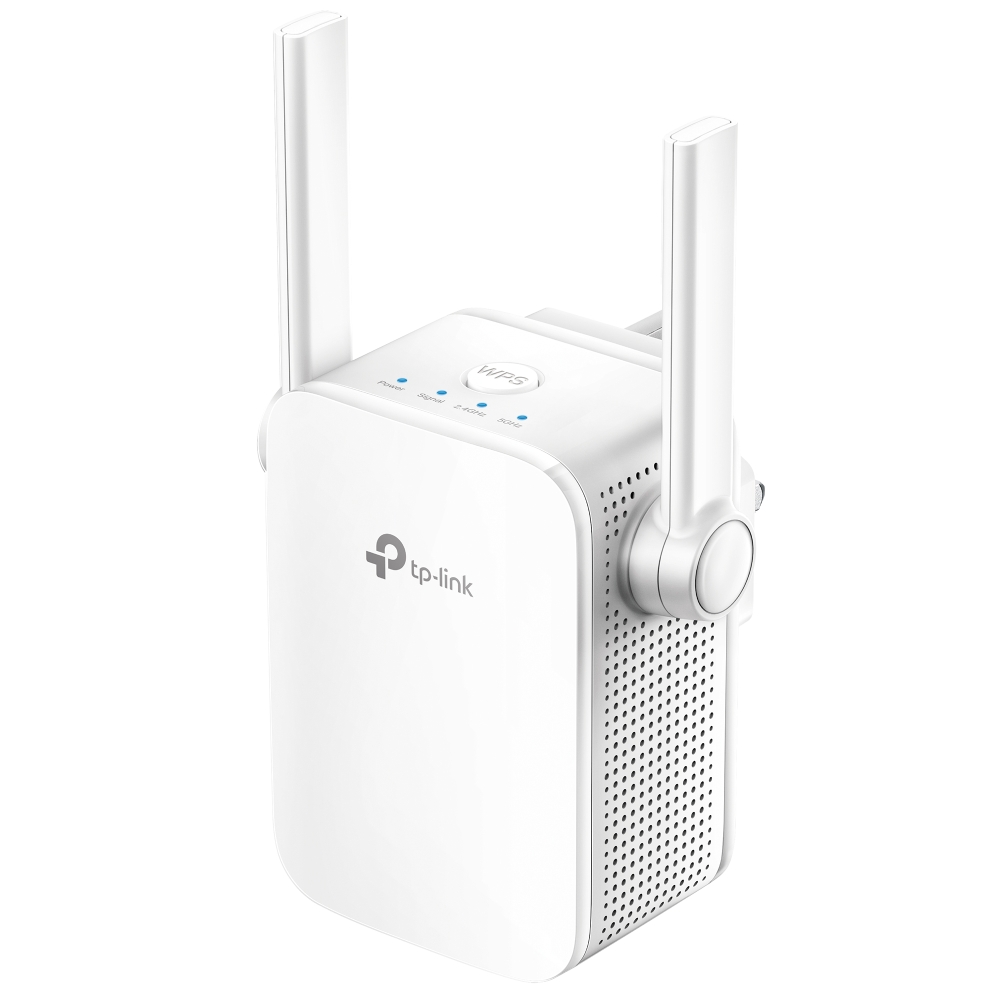
The TP-Link RE205 is a meticulously engineered, compact wireless expansion device designed specifically to eliminate Wi-Fi dead zones, signal dropouts, and frustrating buffering throughout your home or workspace. When searching for the best TP-Link RE205 price India retailers offer, users quickly realize that standalone wireless routers often struggle to penetrate thick concrete walls and reach distant bedrooms or upper floors. In today’s digital environment—where uninterrupted Zoom meetings, HD media streaming, and smart home automation operate continuously—relying on a patchy connection disrupts your daily routine. The RE205 solves this coverage crisis effortlessly by pairing dual-band AC technology with two external signal-boosting antennas. Backed by rigorous quality engineering, it provides a dependable wireless foundation across every corner of your property.
High-Speed AC750 Dual-Band Performance and OneMesh Support
At the absolute core of this AC750 Wi-Fi range extender architecture lies concurrent dual-band transmission delivering combined speeds of up to 750 Mbps (433 Mbps on the 5 GHz band and 300 Mbps on the 2.4 GHz band). The high-frequency 5 GHz band provides dedicated speed for lag-free 4K video streaming and online gaming, while the far-reaching 2.4 GHz band handles essential web browsing, emailing, and background smart appliance connectivity.
Furthermore, acting as a versatile OneMesh wireless extender, the RE205 seamlessly connects to compatible TP-Link OneMesh routers to form a unified, whole-home mesh network under a single Wi-Fi name (SSID). This allows you to walk from room to room without experiencing connection drops, manual reconnects, or speed dips as your phone automatically roams to the strongest available signal.
Intelligent Signal Indicator and Built-in Access Point Mode
Ease of placement and network flexibility are paramount when deploying wireless boosters. The RE205 features an Intelligent Signal Light on its front panel that turns blue when signal strength is optimal and red when positioned too far from the main router, helping you pinpoint the ideal wall outlet within seconds.
Additionally, this versatile dual-band Wi-Fi booster is equipped with a 10/100 Mbps Fast Ethernet port that serves dual functions. In standard Extender Mode, the port allows you to connect wired equipment like smart TVs, desktop PCs, or game consoles to your Wi-Fi network. Alternatively, by switching to Access Point (AP) Mode, you can plug an incoming Ethernet cable directly into the device to transform an existing wired connection into a brand-new dual-band wireless hotspot. Managed effortlessly via the TP-Link Tether App, checking out the hardware specs confirms it is the ideal networking companion for users seeking a reliable balance of speed, convenience, and long-term durability.
Tailoring Your Setup: Versatile Home & Office Coverage
Depending on your specific building layout and structural obstructions, the RE205 adapts seamlessly to your environment:
• Multi-Room & Multi-Story Residences: Bridge the wireless gap between your ground-floor router and upstairs bedrooms or balconies with minimal effort.
• Home Offices & Study Rooms: Provide a dedicated, high-stability wired or wireless connection directly to your workstation for seamless remote collaboration.
🌟 Deep-Dive Features and Benefits
- AC750 Dual-Band Speeds: Delivers 433 Mbps on 5 GHz and 300 Mbps on 2.4 GHz for smooth multitasking and streaming.
- 2 External High-Gain Antennas: Expands wireless reach and enhances signal stability to conquer stubborn dead zones.
- TP-Link OneMesh Compatible: Forms a seamless whole-home mesh network when paired with a OneMesh-supported TP-Link router.
- Intelligent Signal Indicator: Visual LED light guides you to the optimal installation spot between your router and dead zones.
- Built-in Access Point Mode: Transforms existing wired internet lines into a high-speed dual-band wireless network zone.
- Fast Ethernet Port: Connects wired devices such as smart TVs, desktop computers, and gaming consoles with stable speeds.
- TP-Link Tether App Control: Set up and manage your Wi-Fi settings, LED schedules, and access controls right from your mobile device.
- Comprehensive 3-Year Warranty: Shop with absolute peace of mind knowing your networking extender is protected by a reliable manufacturer guarantee.
💼 Applications Across Various Workspaces
- Apartments & Standalone Homes: Eliminate weak signal areas in kitchens, terraces, and backyard patios.
- Remote Workstations: Provide clean, low-latency Wi-Fi to personal laptops and desktop systems in distant study rooms.
- Smart Home IoT Hubs: Maintain strong, persistent wireless connectivity for smart bulbs, smart plugs, and Wi-Fi security cameras.
🔗 Enhance Your Digital Ecosystem
To fully maximize the data throughput of your wireless extension setup, you must surround it with high-performance networking hardware. When connecting your primary router or setting up Access Point mode with the RE205, utilize premium Cat6 High-Speed Ethernet Cables to ensure maximum signal transfer without interference. If you are looking to upgrade your core network origin, pair this extender with an advanced TP-Link Dual-Band Wi-Fi Router. Finally, protect your essential networking gear against sudden power cuts by securing it with a reliable Uninterruptible Power Supply (UPS).
❓ Frequently Asked Questions (FAQs)
1. Will the TP-Link RE205 work with my existing non-TP-Link router?
Yes, absolutely. The RE205 is universally compatible with standard Wi-Fi routers, gateways, and access points from any brand or Internet Service Provider.
2. What is the difference between Range Extender Mode and Access Point Mode?
In Range Extender Mode, the device connects wirelessly to your existing router and repeats the signal into dead zones. In Access Point Mode, it connects to a wired Ethernet line and creates a brand-new wireless hotspot.
3. How do I find the best plug location for the extender?
Use the Intelligent Signal Light on the front of the unit. A solid blue light indicates a healthy, strong connection to your router, while a solid red light indicates it is placed too far away and needs to be moved closer.
4. How do I secure the best price for this range extender in India?
To guarantee you are receiving the most competitive national pricing and 100% genuine hardware, you should procure your TP-Link networking solutions directly through Indica Computers. By bypassing third-party markups, we ensure individual users and corporate procurement teams receive top-tier market value.
5. Does the RE205 support OneMesh?
Yes. When connected to a compatible TP-Link OneMesh router, the RE205 creates a seamless mesh network with a single Wi-Fi name, allowing for uninterrupted roaming without connection drops.
6. Can I connect a wired device like a PC or Smart TV to the extender?
Yes. The RE205 includes a 10/100 Mbps Ethernet port, allowing it to function as a wireless bridge/adapter for wired-only devices.
7. Can I buy this range extender online securely with corporate tax benefits?
Yes, Indica Computers provides a highly secure, fully encrypted online checkout process specifically built for enterprise IT procurement. If you are purchasing networking hardware in bulk for office or retail deployments, you can easily input your company’s GST details during checkout to receive a fully verified tax invoice.
8. What is the warranty coverage provided with the range extender?
The TP-Link RE205 is fully backed by a reliable 3-year limited manufacturer warranty, ensuring complete peace of mind and long-term hardware reliability.
🏬 Why Choose Indica Computers for Your IT Procurement?
- 100% Genuine Hardware Guarantees: We unconditionally guarantee that every single TP-Link product we sell is completely authentic, factory-sealed, and sourced strictly through authorized national distribution channels.
- Seamless Corporate B2B GST Billing: Claim your full input tax credit effortlessly. Our verified, highly automated GST invoicing system is meticulously designed to streamline corporate IT procurement, office infrastructure setups, and bulk hardware deployments for enterprise businesses operating across India.
- Trusted Localized Support & 3-Year Warranty Assistance: Beyond simply moving boxes, we provide fast, localized after-sales assistance. Whether you need wireless setup guidance or assistance filing rapid warranty claims for your robust 3-year manufacturer guarantee, our dedicated hardware experts at Indica Computers are here to assist you every step of the way.
📊 Detailed Technical Specifications
| Attribute | Value |
|---|---|
| Brand | TP-Link |
| Model | RE205 |
| Product Category | AC750 Wi-Fi Range Extender |
| Wireless Standards | IEEE 802.11ac/n/a (5 GHz) | IEEE 802.11b/g/n (2.4 GHz) |
| Signal Rates | 5 GHz: Up to 433 Mbps | 2.4 GHz: Up to 300 Mbps |
| Antennas | 2× External High-Performance Antennas |
| Ethernet Ports | 1× 10/100 Mbps RJ45 Port |
| Working Modes | Range Extender Mode, Access Point Mode |
| Advanced Wireless Features | OneMesh Support, Access Control, LED Control, Power Schedule |
| Wireless Security | 64/128-bit WEP, WPA-PSK / WPA2-PSK |
| Management | TP-Link Tether App (iOS/Android) & Web UI |
| Plug Type & Power | Direct Wall Plug | Max Power Consumption: 7.2 W |
| Physical Dimensions | 80 × 78 × 77 mm (3.15 × 3.07 × 3.03 in) |
| Warranty Coverage | 3-Year Manufacturer Warranty |
📦 Package Contents
- 1 x TP-Link RE205 AC750 Wi-Fi Range Extender
- 1 x Quick Installation Guide
- 1 x Warranty Support Leaflet
Reviews
There are no reviews yet.