
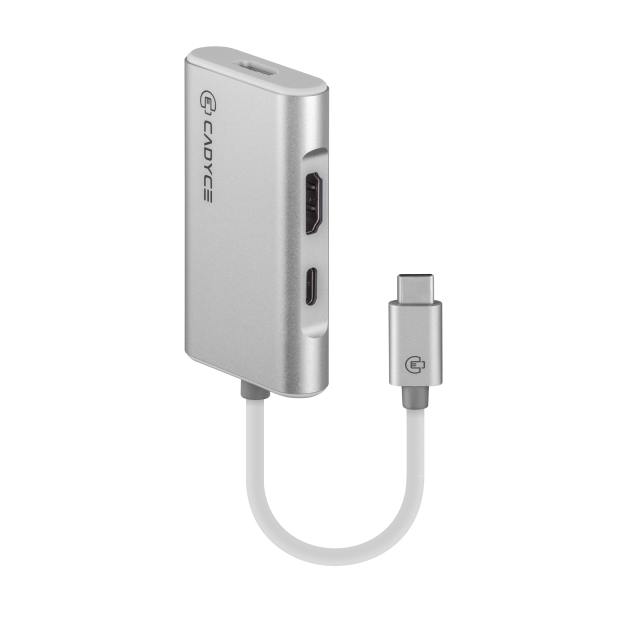
Dual 4K Display Powerhouse with the Cadyce CA-C2HD
Transform your single USB-C or Thunderbolt 3 port into a multi-monitor command center. The Cadyce CA-C2HD USB-C to Dual HDMI Adapter is designed for modern professionals who require expansive screen real estate without compromising on power or performance. Whether you are streaming high-definition video, analyzing data spreadsheets, or running presentation software, this plug-and-play adapter delivers crisp, reliable video output across two external HDMI screens.
Windows Multi-Stream Transport (MST) & 100W Power Delivery
Unlike standard splitters that merely duplicate your screen, the CA-C2HD supports Windows MST technology, enabling you to extend your desktop across independent monitors to skyrocket your workflow efficiency. Better yet, you never have to worry about draining your laptop battery during heavy usage. The dedicated USB-C pass-through charging port supports up to 100W Power Delivery (20V@5A), feeding maximum power back to your host machine while simultaneously driving your displays and transferring data at speeds up to 10Gbps.
🌟 Key Features of the Cadyce CA-C2HD
- Dual HDMI 4K Connectivity: Connect up to two HDMI displays simultaneously, supporting high-definition resolutions up to 4K x 2K for ultra-clear visuals.
- 100W USB-C Power Delivery: Integrated PD pass-through charging port delivers up to 100W of power to keep your laptop charged while in use.
- Windows MST Technology: Extend your Windows desktop across multiple screens independently for seamless multitasking (macOS supports mirroring/SST mode).
- High-Speed 10Gbps Bandwidth: Thunderbolt 3 compatible architecture supports blazing-fast data throughput up to 10Gbps.
- Plug and Play Simplicity: Driverless setup ready to work instantly across Windows, macOS, Linux, and Google Chrome OS.
- Bus Powered & Portable: Lightweight aluminum build that draws operational power directly from your computer without bulky external bricks.
💼 Applications of the Cadyce CA-C2HD
- Financial & Financial Trading Desks: Easily track real-time stock charts, spreadsheets, and news feeds across dual external displays at your Heritage Town office setup.
- Creative Studio Multitasking: Keep your editing timeline on one 4K screen while previewing full-screen video renders on the second HDMI monitor.
- Remote Workstations: Rapidly turn your portable USB-C laptop into a permanent, multi-screen office desktop setup with a single cable connection.
📊 Technical Specifications
| Specification | Details |
|---|---|
| Brand | Cadyce |
| Model | CA-C2HD |
| Input Connector | 1 x USB 3.1 Type-C Male (Thunderbolt 3 Compatible) |
| Video Output Ports | 2 x HDMI 1.4 Female |
| Max Resolution Supported | Up to 4K x 2K (3840 x 2160) |
| Data Transfer Bandwidth | Up to 10Gbps |
| Power Delivery (PD) Port | 1 x USB-C Female (Supports up to 100W / 20V@5A Pass-Through) |
| Power Mode | USB Bus Powered |
| OS Support | Windows OS (MST Support), Mac OS, Linux, Chrome OS |
| Certifications | CE, FCC, RoHS |
| Warranty | 1 Year Manufacturer Warranty |
ℹ️ Manufacturer Documentation: For more technical details, downloaded datasheets, and official certification information, visit the official Cadyce CA-C2HD product page.
📦 Package Contents
- 1 x Cadyce CA-C2HD USB-C to Dual HDMI Adapter
- User Manual
❓ Frequently Asked Questions
1. Can I extend two different screens on my MacBook using this adapter?
No, macOS does not support Multi-Stream Transport (MST) over a single USB-C/Thunderbolt output. When connected to a Mac, both external monitors will display a mirrored (SST) image. For independent extended screens, a Windows PC supporting MST is required.
2. Will it charge my laptop while both monitors are connected?
Yes, the adapter includes a 100W USB-C Power Delivery pass-through port. Simply connect your laptop’s USB-C power adapter into this port to keep your machine charged while driving both HDMI monitors.
3. Do I need to install any software or drivers?
No, the CA-C2HD is a completely plug-and-play device. It installs automatically upon being plugged into a compatible USB-C or Thunderbolt 3 port.
🏬 Why Buy from Indica Computers?
- Genuine Products: We guarantee 100% authentic IT hardware and connectivity gear sourced directly from authorized Cadyce distributors.
- GST Billing: B2B customers and corporate IT procurement teams can effortlessly claim input tax credit using our verified GST invoices on all corporate orders.
- Expert Product Consultation: Not sure if your laptop’s USB-C port supports DisplayPort Alt Mode or MST? Our tech experts in Heritage Town are ready to verify compatibility before you buy.
- Fast Shipping Across India: Enjoy secure, robust packaging and rapid delivery right to your home office or commercial premises.
- Trusted IT Solutions Provider: Based in Puducherry, Indica Computers provides dedicated after-sales support for enterprise and retail clients nationwide.
Reviews
There are no reviews yet.