
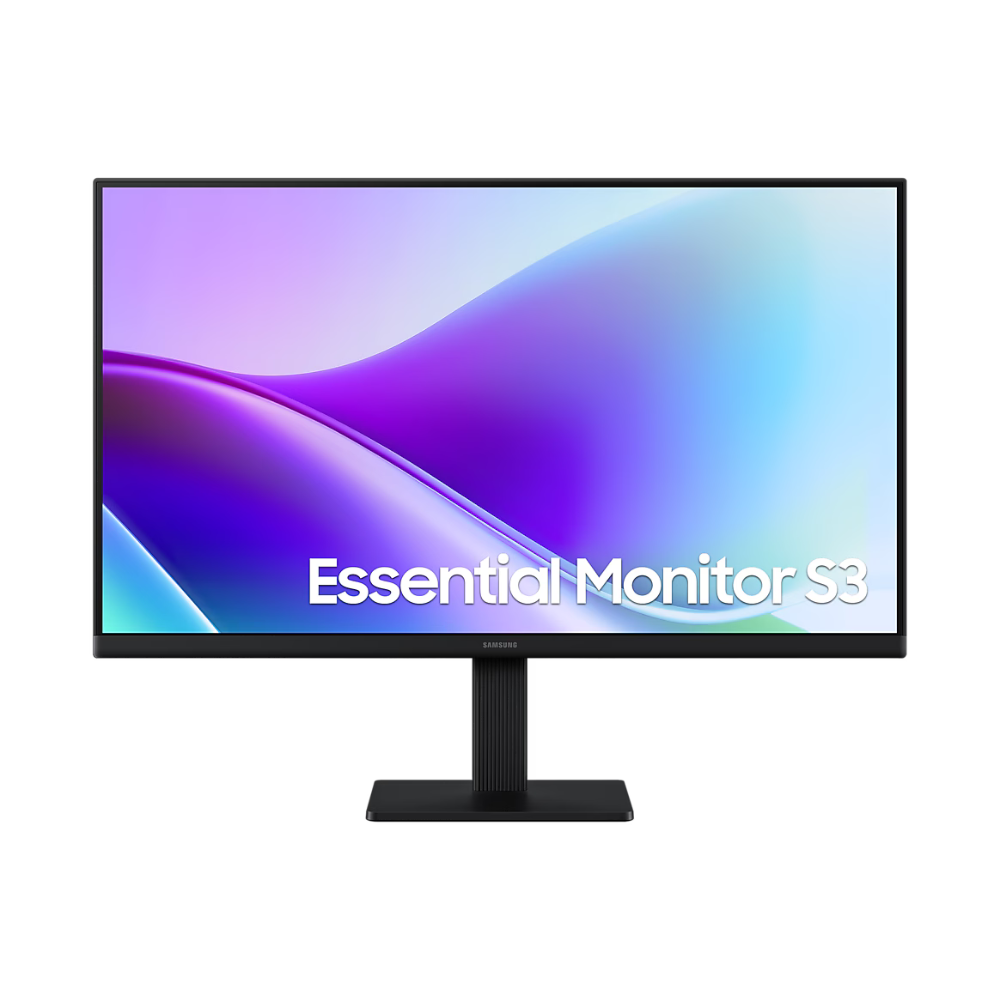
Unlock Fluid Productivity with the Samsung S22F320GAW
Modern professionals and casual gamers demand screens that keep up with fast-paced workflows without sacrificing visual quality. The Samsung S22F320GAW steps up to the challenge, pairing a vibrant Full HD IPS panel with a remarkably smooth 120Hz refresh rate. Whether you are scrolling through extensive spreadsheets, editing multimedia, or unwinding with a video game, this monitor guarantees a pristine, lag-free viewing experience from virtually any angle.
Why the Samsung S22F320GAW is the Ultimate 22-Inch Monitor
Unlike standard 60Hz displays, this monitor dramatically reduces motion blur and input lag, offering an immediate, noticeable upgrade in how smooth everything feels on screen. Packaged in a super-slim, borderless design, it maximizes your viewing area while keeping your desk looking neat and modern. With advanced Eye Saver Mode and dual HDMI connectivity, it is a versatile powerhouse ready for dual-monitor corporate setups and home entertainment alike.
🌟 Key Features of the Samsung S22F320GAW
- Ultra-Smooth 120Hz Refresh Rate: Double the standard refresh rate means significantly reduced lag and motion blur, ensuring everything from cursor movements to fast-paced gaming is incredibly fluid.
- Brilliant IPS Panel: Experience stunning color accuracy and consistent shades. The expansive 178° viewing angles ensure clarity from almost any position without frustrating color washing.
- Super Slim Borderless Design: The ultra-thin bezels create a modern aesthetic that enhances focus and makes this monitor the perfect candidate for seamless, multi-display workstations.
- Game Picture Mode: Instantly optimize contrast and color settings for various game genres, allowing you to spot details and enemies hiding in the dark.
- Advanced Eye Care: Stay comfortable during long sessions. Built-in Eye Saver Mode cuts down harmful blue light, while Flicker-Free technology continuously removes tiring screen flicker.
- Dual HDMI Connectivity: Featuring two HDMI 1.4 ports, you can keep both your PC and a secondary device (like a laptop or gaming console) plugged in simultaneously for ultimate convenience.
💼 Applications of the Samsung S22F320GAW
- Modern Workspaces: The perfect fit for corporate offices needing crisp text clarity, eye protection, and dual-monitor compatibility.
- Casual Gaming: The 120Hz refresh rate and Game Mode provide a massive competitive edge and smoother visuals over standard budget monitors.
- Students & E-Learning: Protects vision during long study sessions, online classes, and coding marathons.
- Content Creation: The IPS panel ensures reliable color representation (72% NTSC) for entry-level photo editing and graphic design.
📊 Technical Specifications
| Specification | Details |
|---|---|
| Brand | Samsung |
| Model | S22F320GAW (LS22F320GAWXXL) |
| Screen Size | 22 Inches (54.6 cm) |
| Panel Type | IPS (Flat) |
| Resolution | FHD (1920 x 1080) |
| Refresh Rate | 120Hz (Max) |
| Response Time | 5ms (GTG) |
| Aspect Ratio | 16:9 |
| Brightness (Typical) | 250 cd/㎡ |
| Contrast Ratio | 1000:1 (Static) |
| Viewing Angle (H/V) | 178° / 178° |
| Color Support | 16.7 Million Colors (72% NTSC) |
| Ports & Connectivity | 2x HDMI (v1.4) |
| Ergonomics (Tilt) | -2.0°(±2.0°) ~ 21.0°(±2.0°) |
| Wall Mountable | Yes (VESA 100 x 100 mm) |
| Dimensions (With Stand) | 489.9 x 400.0 x 175.1 mm |
| Weight (With Stand) | 2.1 kg |
| Warranty | 3-Year Manufacturer Warranty |
📦 Package Contents
- Samsung Essential S3 22″ Monitor (S22F320GAW)
- Monitor Stand & Base
- HDMI Cable
- External Power Adapter & Cable (1.5m)
- Quick Setup Guide & Warranty Documentation
❓ Frequently Asked Questions
1. How do I enable the 120Hz refresh rate on the Samsung S22F320GAW?
The default refresh rate out of the box is usually set to 60Hz. You can easily adjust it to the maximum 120Hz by navigating through your Windows or Mac display settings.
2. Does this monitor have built-in speakers or a headphone jack?
No, this model does not feature built-in speakers, nor does it include an audio/headphone output port. Audio must be routed directly from your PC to your speakers.
3. Can I connect two devices to this monitor at once?
Yes! It comes equipped with dual HDMI 1.4 ports, allowing you to connect a desktop PC and a laptop simultaneously and switch between them using the Auto Source Switch feature.
4. Is it possible to mount this monitor on a monitor arm?
Absolutely. The monitor supports standard VESA 100x100mm mounting, making it easy to attach to wall brackets or multi-monitor desk arms.
5. Will it work with older VGA connections?
No, the S22F320GAW relies entirely on digital inputs and only features HDMI ports. If you are using an older desktop with only VGA, you will need an active VGA-to-HDMI adapter.
🏬 Why Buy from Indica Computers?
- Genuine Products: We supply 100% authentic IT hardware sourced straight from Samsung’s authorized distribution network.
- GST Billing: B2B customers can smoothly claim input tax credit utilizing our verified GST invoices for corporate orders.
- Expert Product Consultation: Unsure if this monitor fits your desk or GPU? Our in-house experts are ready to guide you.
- Fast Shipping Across India: Expect secure, robust packaging and rapid delivery right to your door.
- Competitive Pricing: We pride ourselves on providing the best market rates on premium monitors and IT peripherals.
- Trusted IT Solutions Provider: Based in Puducherry, Indica Computers guarantees dedicated after-sales support for businesses and retail buyers alike.
Reviews
There are no reviews yet.