
Streamline Your Workspace
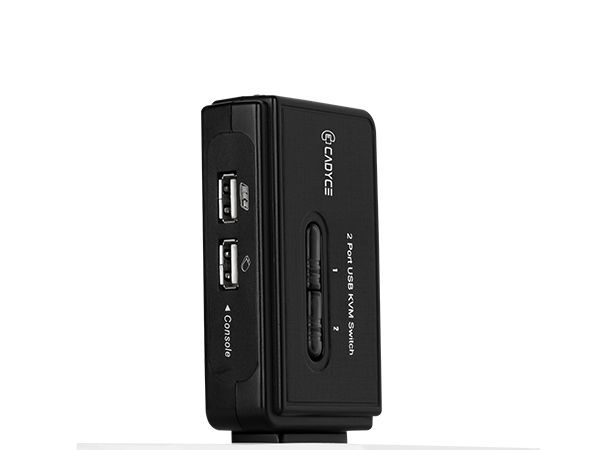
Managing two separate computer systems often means dealing with a cluttered desk full of redundant keyboards, mice, and monitors. The Cadyce CA-UK200 2-Port USB KVM Switch solves this problem instantly. By routing two computers through a single set of USB peripherals and a VGA display, you save valuable desk space, reduce hardware costs, and improve your daily workflow.
High-Resolution Display & Easy Switching
Unlike lower-grade switches that degrade video quality, the CA-UK200 supports an ultra-high VGA resolution of up to 2048 × 1536, ensuring that graphic designers, network administrators, and office professionals enjoy sharp, uncompromised visuals. Switching between your connected PCs is effortless—choose between a physical push-button on the device, convenient keyboard hotkeys, or a dedicated software client.
🌟 Key Features of the Cadyce CA-UK200
- 2-Port KVM Control: Operate two PCs or Macs using just one USB keyboard, one USB mouse, and one VGA monitor.
- Superior Video Quality: Enjoy crisp, professional-grade imagery with maximum VGA resolutions up to 2048 × 1536.
- Triple Switching Options: Toggle between computers via the front-panel push button, keyboard hotkeys, or an intuitive software interface.
- True Plug & Play: Supports hot-plugging, meaning you can connect or disconnect computers without having to power down the KVM switch or the PCs.
- All-Inclusive Setup: Operates completely via USB bus power (no bulky wall adapters needed) and includes two premium 1.2m USB KVM cables in the box.
💼 Applications Across Workspaces
- IT & Network Administration: Effortlessly manage and troubleshoot multiple servers or testing rigs from a single control console.
- Home Offices & Freelancers: Seamlessly switch between a personal desktop and a corporate work laptop without swapping cables.
- Commercial Kiosks & Retail: Control dual backend systems powering point-of-sale or digital signage screens efficiently.
📊 Detailed Technical Specifications
| Attribute | Value |
|---|---|
| Brand | Cadyce |
| Model | CA-UK200 |
| Product Type | 2-Port Desktop USB KVM Switch |
| Max Resolution | Up to 2048 × 1536 (High VGA) |
| Input Ports (PC Side) | 2 × VGA (HDB15 Female) |
| Console Ports | 2 × USB Type-A (Keyboard/Mouse), 1 × VGA (Monitor) |
| Channel Selection | Push Button / Keyboard Hotkeys / Switching Software |
| LED Indicators | 2 × Green (Indicates PC1 / PC2 Activity) |
| Power Source | USB Bus Powered (No external power required) |
| Operating System Support | Windows, Mac OS, Linux |
| Cables Included | 2 x 1.2m USB KVM Cables |
| Dimensions (L x W x H) | 96 × 61 × 27.5 mm |
| Weight | Approx. 90g |
| Certifications | CE, FCC, RoHS |
| Warranty | 1 Year Manufacturer Warranty |
📦 Package Contents
- 1 x Cadyce CA-UK200 2-Port USB KVM Switch
- 2 x 1.2m USB KVM Cables
- 1 x User Manual
🏬 Why Buy from Indica Computers?
- 100% Genuine Products: We guarantee authentic Cadyce IT peripherals sourced directly from authorized distribution channels.
- B2B GST Billing: Claim full input tax credit through our verified GST invoicing system for your commercial establishment.
- Trusted After-Sales Support: We provide fast, localized assistance for warranty claims and operational guidance.
Reviews
There are no reviews yet.