
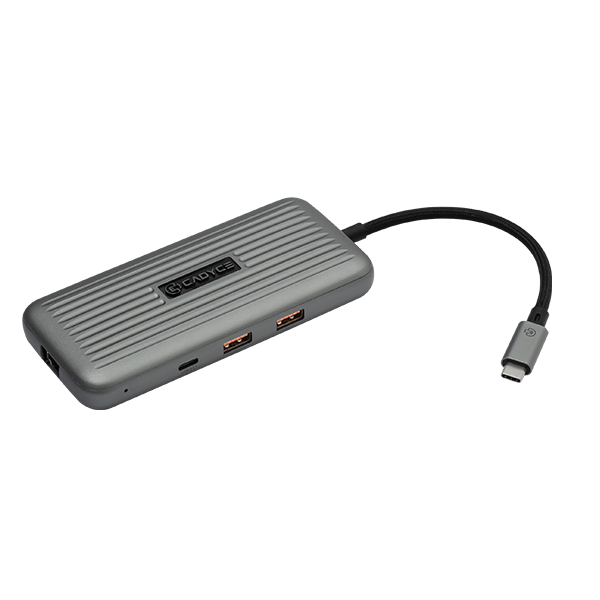
Transform Your Laptop into a Desktop Powerhouse with the Cadyce CA-C4VIEW
Modern laptops are incredibly portable, but their lack of ports can severely bottleneck your daily productivity. The Cadyce CA-C4VIEW USB-C Docking Station completely solves this issue by expanding a single USB-C port into a massive, multi-functional hub. Whether you are connecting to high-end 8K monitors, transferring massive video files at 10Gbps, or relying on a stable wired Gigabit LAN connection, this premium docking station delivers uncompromised performance for creative professionals and corporate users alike.
Why the Cadyce CA-C4VIEW is the Ultimate Workspace Upgrade
Unlike basic dongles that struggle with high resolutions and power demands, the CA-C4VIEW is engineered for maximum performance. It allows you to charge your laptop at top speed via its 100W USB-C Power Delivery port while simultaneously running resource-heavy peripherals. With support for Windows MST (Multi-Stream Transport) and broad compatibility with Mac OS, this sleek, bus-powered hub eliminates cable clutter and keeps you focused on your work.
🌟 Key Features of the Cadyce CA-C4VIEW
- Extreme 8K & 4K Video Output: Connect to ultra-high-definition displays with the HDMI port (up to 4K@60Hz), DisplayPort™ (up to 8K@30Hz), or the USB-C video port (up to 8K@30Hz). A VGA port is also included for legacy 1080p monitors.
- 100W Power Delivery (PD): Pass-through charging allows you to power your laptop efficiently (up to 100W) without sacrificing a port, keeping your battery full during heavy workloads.
- Lightning-Fast Data Transfer: Both the dual USB-A 3.1 Gen 2 ports and the USB-C 3.1 Gen 2 port deliver blazing data speeds up to 10Gbps, allowing you to transfer massive files in seconds.
- BC 1.2 Fast Charging Support: The high-speed USB ports also feature BC 1.2 technology, allowing you to quickly charge your smartphones, tablets, and wireless accessories right from the dock.
- Reliable Gigabit Ethernet: Stop relying on unstable Wi-Fi. The RJ45 Gigabit LAN port delivers fast, uninterrupted wired network speeds (10/100/1000Mbps) and features PXE Booting support for enterprise IT environments.
- Universal Compatibility: Enjoy true plug-and-play functionality across Mac OS and Windows systems, with full support for Windows MST for expansive multi-monitor setups.
💼 Applications of the Cadyce CA-C4VIEW
- Content Creators & Video Editors: Take advantage of the 8K DisplayPort and 10Gbps USB ports to edit ultra-high-definition video timelines without lag or stutter.
- Corporate IT & Enterprise Users: Utilize the Gigabit LAN port with PXE 2.1 booting support for secure, network-based system deployment and management.
- Home Office Setup: Connect your laptop to a primary 4K monitor, a secondary 1080p VGA display, your wired keyboard, and mouse through one single, neat connection.
- Traveling Professionals: Measuring just 134mm long, this lightweight (150g) hub slips easily into your laptop bag for powerful presentations and connectivity on the go.
📊 Technical Specifications
| Specification | Details |
|---|---|
| Brand | Cadyce |
| Model | CA-C4VIEW |
| Product Type | USB-C Docking Station |
| Input Interface | 1 x USB-C (Male) |
| Video Output Ports | 1 x HDMI (4K@60Hz), 1 x DisplayPort™ (8K@30Hz), 1 x USB-C (8K@30Hz), 1 x VGA (1920×1080@60Hz) |
| High-Speed USB Ports | 2 x USB-A 3.1 Gen 2 (10Gbps, BC1.2), 1 x USB-C 3.1 Gen 2 (10Gbps, BC1.2) |
| Power Delivery (PD) | 1 x USB-C PD Female (Up to 100W Pass-Through) |
| Networking | 1 x Gigabit LAN (10/100/1000Mbps) with PXE 2.1 Support |
| Power Source | Bus Powered |
| Operating System Support | Windows (Supports MST), Mac OS |
| Integrated Cable Length | 15 cm (150 mm) |
| Dimensions (L x W x H) | 134 x 60 x 18 mm |
| Weight | 150 g |
| Certifications | CE, FCC, UKCA, RoHS |
| Warranty | 1 Year Manufacturer Warranty |
📦 Package Contents
- Cadyce CA-C4VIEW USB-C Docking Station
- User Manual & Installation Guide
❓ Frequently Asked Questions
1. Does the Cadyce CA-C4VIEW support dual or triple monitor setups?
Yes, it supports multiple displays. For Windows users, MST (Multi-Stream Transport) is supported, allowing for extended displays across the HDMI, DisplayPort, and VGA outputs.
2. Can I use the 8K DisplayPort on any laptop?
To achieve 8K@30Hz resolution, your host device (laptop/PC) must support DisplayPort 1.4 alt mode via its USB-C port.
3. Will this dock charge my laptop while I use it?
Yes! By plugging your laptop’s USB-C charger into the dedicated 100W PD female port on the dock, it will pass power directly to your laptop while running all other peripherals.
4. Do I need to install software for the Gigabit Ethernet port?
No, the docking station is fully plug-and-play. Modern Windows and macOS systems will automatically recognize the wired connection.
5. What is BC 1.2 charging?
Battery Charging (BC) 1.2 is a standard that allows the dock’s USB ports to safely deliver more power to mobile devices like smartphones and tablets, charging them much faster than standard USB data ports.
🏬 Why Buy from Indica Computers?
- Genuine Products: We guarantee 100% authentic IT hardware and premium hubs sourced directly from authorized Cadyce distributors.
- GST Billing: B2B customers can effortlessly claim input tax credit using our verified GST invoices for all corporate orders.
- Expert Product Consultation: Unsure if this 8K dock is compatible with your specific workstation? Our in-house tech experts are ready to assist you.
- Fast Shipping Across India: Enjoy secure, robust packaging and rapid delivery right to your home office or corporate desk.
- Competitive Pricing: We pride ourselves on offering the most competitive market rates on high-end connectivity tools and IT peripherals.
- Trusted IT Solutions Provider: Based in Puducherry, Indica Computers provides dedicated after-sales support for businesses and retail clients nationwide.
Reviews
There are no reviews yet.